A Digital Property Identity (DPI) connects a property to its record on Urbn. It brings property details, verification status and the activities in its spaces together, so the record can continue as people change.
Why Property Identity Matters
A property's details should stay connected, whoever owns, manages or occupies it.
What a Connected Record Makes Possible
How to Register Your Property
Add your details in Urbn and follow the checks required for your property.
Add Property Details
Add the property's address and details in the Urbn app, with the information required for your role.
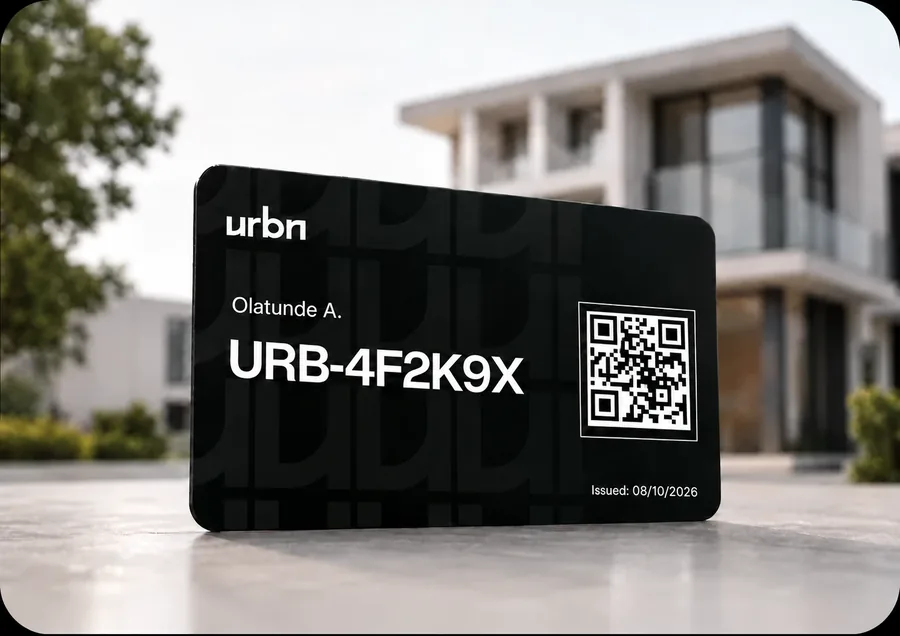
What Is a Property Card?
A Property Card shows the relationship to a property recorded on your Urbn account, as a resident or an owner.
Who It's For
Residents and owners whose relationship to a property is recorded on Urbn.
How to Request One
Request it in the Urbn app once your tenancy or ownership is recorded against the property.
What It Shows
Your name, your Urbn User ID, an issue date and a QR code linked to the relationships recorded on your account.
The Plaque
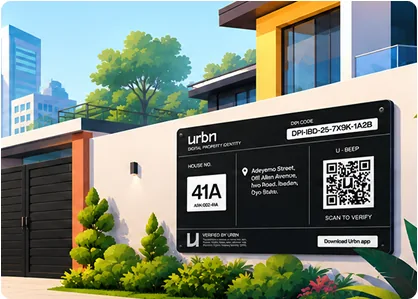
What's on the Plaque?
Check current verification status online.
Digital Property Identity
DPI Code
SAMPLE-0001-D
House No.
12 Example Street,Ibadan,Oyo State.
U - Beep
Scan to View Record
Verified by Urbn
This property has a Digital Property Identity on Urbn. Scan the QR code to view its record and current verification status.
DPI Code
The property's identifier on Urbn.
QR Code
A link to its record.
House Number
The displayed property number.
Urbn Mark
Identifies the plaque's issuer.
How to Read a DPI Code
Understanding a DPI Code
Each part of the code has a job. A valid format is not the same as a verified record.
Individual spaces in a building, such as a flat, a shop or an office suite, may have their own unit identifier linked to the property, for example SAMPLE-0001-D/U01. Enter the full unit code to view that space's available record.
Plaque Formats
One Property Identity. Two Plaque Formats.
Both link to the property's Urbn record.
Physical Plaque
Displayed at the property. Scan its QR code to open the property's record.
Digital Property Identity
DPI Code
SAMPLE-0001-D
House No.
12 Example Street,Ibadan,Oyo State.
U - Beep
Scan to View Record
Verified by Urbn
This property has a Digital Property Identity on Urbn. Scan the QR code to view its record and current verification status.
Digital Plaque
Shared electronically, for example alongside a listing, and linked to the same record.
Lifecycle
A Record That Continues
The identity stays linked to the property as its details, people and activities change.
One Identity per Property
Each property is given one DPI on Urbn.
Linked to the Property
When an owner sells, a tenant moves out or a manager changes, the DPI stays with the property. The people linked to the record change.
Updated Through Urbn
Changes to the record go through Urbn's process rather than being edited directly by an individual agent or owner.
History You Can Follow
View the updates available in the property's record over time.
FAQs
Questions about property identity, inspections or getting started? Find out how Urbn works.
Open Urbn's official website or app and look up the code. Compare the property details and current status. A copied code or plaque alone does not establish that a transaction is legitimate.

Your Property. Your Next Step.
Find a property, check its record or bring your own property onto Urbn. Start with what you need today.